
Who is behind this. Pro Skill Packs is a small independent publisher of ready-made skills and fill-in kits. Every one is run on real examples before release.
- How we test
- 30-day refund, no questions about why
- Contact page, or write to kaiventura.founder@gmail.com
Paste your resume bullets and a job post.
Clearer bullets with every missing number marked for you to confirm, and a table of what the job asks that you do not yet show.
Before and after
Taken from the skill's README.
Before: "Responsible for managing the company newsletter and social media accounts"
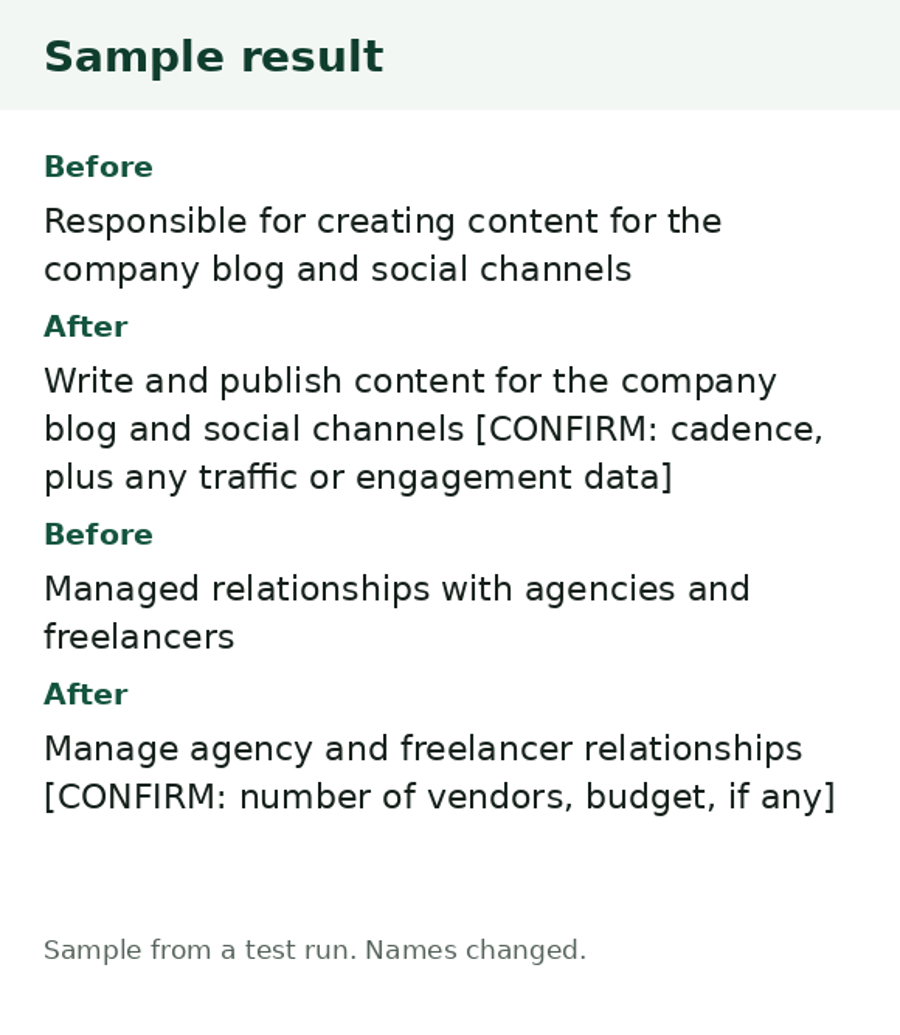
After (skill output, from a real test run): Test run on sample bullets and a public job post for a principal-level role. Rewrite, unedited: "Manage the company newsletter and social media accounts [CONFIRM: audience size or growth, if any]". The run said plainly that most of the post's requirements were a Gap for this resume, asked five questions to fill the missing results, and suggested the person might apply to roles at a closer level. It did not invent a single number.
What it does
Paste your bullets and a job post. It lists what the post asks for, rewrites each bullet using only the facts you gave, marks every missing number or result as [CONFIRM: ...] with a question to answer, and shows a fit table: Covered, Partly or Gap for each requirement. It never invents tools, results, titles or dates.
How it was tested
What you can check yourself. The sample result on this page, the list of what is in the file, and the 30-day refund. There are no ratings yet, because nobody has reviewed it yet.
How we tested it.
1 real-data run on sample bullets and a public job post (Claude Sonnet). We changed placeholder wording after the run so it never implies a result.
Tested on a real example before release. The example is shown in the Before and after section above.
How we test, what we do not do, and which assistants we ran it on.
Limits
- It does not make you a better fit than you are. Gaps stay gaps; it tells you what you could add if it is true.
- It does not check how an applicant tracking system will score a resume, and it promises no interviews.
- It works on bullets and a post. It does not design the resume layout or write a cover letter.
- Some countries expect different resume norms. Tell it where you are applying.
Works with
Works in ChatGPT or any chatbot: you paste in your details and it writes the result.
Where to start
- Try the free one first. Job Post Decoder: Paste a job post. Get what the job is, firm and wish requirements, what is missing and questions for the recruiter. Free, MIT-licensed.
What is in the download
Read from the real file.
LICENSE.txtREADME.mdSKILL.mdprompt.mdresume-bullet-rewriter-prompt-card.pdf
Get it
- You get: a zip file (double-click it to open it).
- Checkout: Gumroad opens on this page. Click Add to cart, enter your email and card details, and check the total, with any VAT, before you pay. Prices here are in US dollars.
- After you pay: a download page opens right away with the zip file, and Gumroad gives you a receipt there that you can resend. Open it and follow the README.
One-time payment. Updates to this version are free. Questions or a refund: reply to your receipt within 30 days, or write to kaiventura.founder@gmail.com.
Using it with an AI assistant
- Unzip the download. It holds the
resume-bullet-rewriterfolder, a README and the licence. - Put the
resume-bullet-rewriterfolder where your assistant looks for skills. The generic path is.agents/skills/(ornpx skills addfrom a folder). Tool-specific paths:- Claude Code:
~/.claude/skills/(or.claude/skills/inside one project) - OpenAI Codex, Gemini CLI, Cursor and others:
.agents/skills/or the skills folder their docs name - claude.ai: zip the skill folder yourself, then Customize, Skills, the plus button, Create skill, Upload a skill (code execution must be on in Settings, Capabilities)
- ChatGPT or any chatbot: open the skill's
prompt.md, paste it into the chat, then paste your own text or link - Steps for each tool, with links to its official docs: how to install Agent Skills
- Claude Code:
- Ask for the job in plain words, for example: "Rewrite my bullets for this job post. [paste bullets] [paste or link the post]". The skill loads by itself.
Related
- Free guide to do it by hand: How to rewrite resume bullets without inventing numbers
- Job Post Decoder (Free): Paste a job post. Get what the job is, firm and wish requirements, what is missing and questions for the recruiter. Free, MIT-licensed.
- More for job seekers: Job seekers and careers
Report a problem with this skill (GitHub, or write to kaiventura.founder@gmail.com).