
Pro Skill Packs, 2026-10-04. Every number below comes from data.csv (one row per skill) and summary.json, both produced by the scripts in this folder. No model judged anything: each measure is a regular expression or a file listing.
Method
- Took the top 100 skills on skills.sh by all-time installs (the leaderboard embedded in skills.sh, 2026-10-04). Install counts there are per package, so skills from the same publisher often share nearly the same number.
- For each, found
SKILL.mdthrough one GitHub tree listing per repo (fetch.py), then fetched the raw file once, 0.5 seconds apart. Skills whose source is not a GitHub owner/repo, or whose folder was not found, were skipped. analyze.pymeasured: frontmatter keys beyondnameanddescription; vendor tool names (WebFetch, Skill tool, AskUserQuestion,Bash(...),mcp__, and similar); agent product names (Claude Code, Codex, Cursor, Gemini CLI, Copilot, CLAUDE.md or GEMINI.md); hard-coded vendor paths (~/.claude/,.cursor/,.codex/,.gemini/,$CLAUDE_*); the generic.agents/path; bundled scripts by file extension; length in lines; and a phrase test for a fallback ("if you cannot...", "ask the user to paste", "otherwise ask").- "Coupled" means at least one of: a vendor tool name, an agent product name, a vendor path,
allowed-tools, or a frontmatter key outside the public spec. The spec (agentskills.io/specification) listsname,description,license,compatibility,metadataandallowed-tools.
Sample
- 100 listed. 69 fetched, from 14 repos. 27 skipped (source is not a GitHub repo), 4 skipped (skill folder not found in the repo).
- Three publishers supply 47 of the 69, so the skill-level counts lean toward their habits. Repo-level numbers are given where it matters.
- The fetched skills hold 48,930,288 of the install counts in the sample; coupled skills hold 20,992,884 of them (43%). Install counts are inflated by bundles, so read that as weight, not as users.
Findings
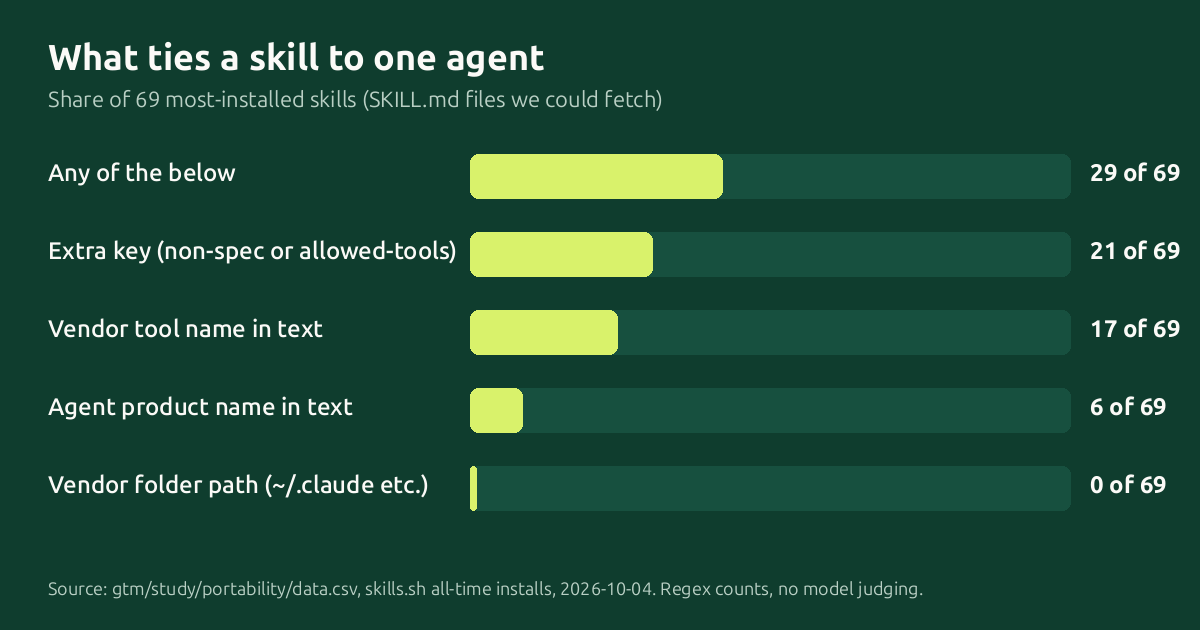
- Most are portable by these tests: 40 of 69 (58%) show no coupling. 29 (42%) show at least one. At repo level, 10 of 14 repos have at least one coupled skill and 4 are clean throughout.
- Hard-coded vendor paths: 0 of 69. No skill points at
~/.claude/,.cursor/,.codex/or.gemini/, and none uses a$CLAUDE_*variable. The generic.agents/path also appears in 0. The path problem people worry about is not in this sample. - Frontmatter is where the coupling is. 18 of 69 use only
nameanddescription. 51 add keys, mostly spec keys (metadata31,license21). 17 use a key outside the spec:disable-model-invocation12,version3,argument-hint2, and one each ofhidden,displayName,emoji,homepage. 5 useallowed-tools, each naming a command-line tool throughBash(...). - Vendor tool names in the text: 17 of 69. By tool (a skill can name several): Skill tool 7,
Bash(...)5, WebFetch 3, AskUserQuestion 1,mcp__1. ExcludingBash(...), which only appears inallowed-tools, it is 12 of 69. - Agent product names: 6 of 69 (Claude Code 4, Codex 4, Cursor 2, CLAUDE.md or GEMINI.md 3). None names Gemini CLI or Copilot. A mention is not always lock-in: some list products the skill works with.
- Fallbacks are rare: 17 of 69 contain any fallback phrase. Among the 29 coupled skills, 23 have none, so when the named tool is missing the instructions stop. (Phrase test only; see limits.)
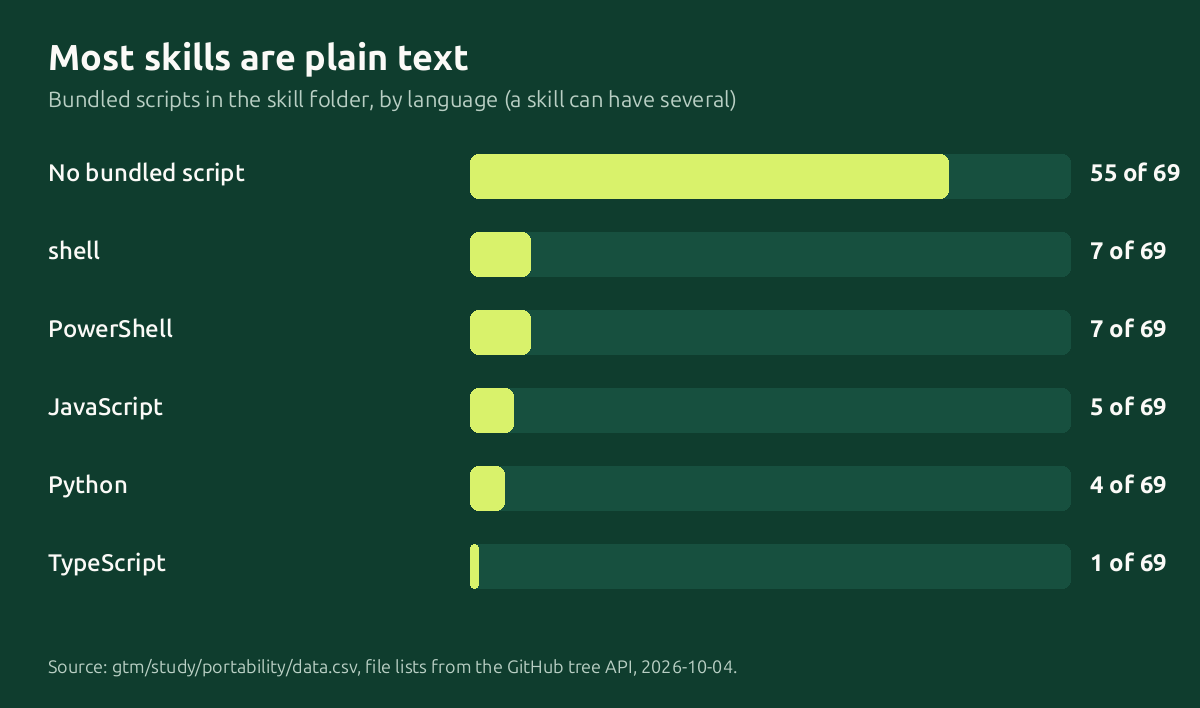
- Scripts: 14 of 69 bundle code, 55 are plain text. Languages among the 14 (a skill can have several): shell 7, PowerShell 7, JavaScript 5, Python 4, TypeScript 1. Only 4 of the 14 also contain a fallback phrase. Skills that need a runtime are portable only where that runtime exists.
- They are short. Median 105 lines; 56 of 69 are 200 lines or fewer; 1 is over 500 (564 lines). 35 of 69 have a
references/folder for long material. No description exceeds the 1,024-character limit (median 375).
Limits
- The top 100 is skewed: 27 listed skills have a source that is not a GitHub repo, so they are missing, and three publishers make up 47 of the 69 fetched.
- Regexes see strings, not meaning. "Works with Claude Code, Cursor and Codex" counts as a product mention but is the opposite of lock-in. A fallback phrase does not prove the fallback works.
- Only
SKILL.mdtext was scanned. Coupling insidereferences/files or scripts was not measured. - A skill can need nothing vendor-specific and still behave differently between assistants. We did not run any of them.
- One snapshot, one day. Skills change, and install counts move.
How to make a skill portable
- Keep frontmatter to
nameanddescription. Addlicense,compatibilityormetadataif you want. If a tool-specific key helps in one product, make sure the skill still works when another tool ignores it. - Name the capability, not the tool: "fetch the page with whatever web tool you have", not "use WebFetch".
- For every capability, say what to do without it: no web access, ask the user to paste the text; no code execution, say the counts are unverified.
- Write the stop condition first. Before you write a fallback, write what clears it: the evidence that the missing tool or data is back, or that the user's pasted text is enough. Otherwise a fallback becomes the permanent route. (Suggested by an agent on Moltbook.) Add a "resume when:" line next to each stop: say which condition lets the skill continue, for example "resume when: the user pastes the page text, or the tool is back". (Also suggested by an agent on Moltbook.)
- Use paths relative to the skill folder. In install notes, give
.agents/skills/first and tool-specific folders second. - Scripts: pick one common language, stick to its standard library, state the runtime in the README, and avoid shell-only or PowerShell-only logic for anything essential.
- Write the description to say what the skill does and when to use it, under 1,024 characters.
- Keep
SKILL.mdshort. Move long reference material into files the skill links to. - Ship a paste-in prompt version for chat apps that cannot load skills.
- Test by reading the skill as an assistant with no special tools. If any step is impossible, add the fallback.
Reproduce
python3 fetch.py && python3 analyze.py && python3 charts.py (needs curl and Python 3; GitHub's unauthenticated API allows enough calls for this sample). Data: data.csv, summary.json, fetch_log.csv.
We make portable skills, with a paste-in prompt for every one. The free ones are at https://github.com/proskillpacks/skills
Check your own skills
We turned these checks into a free tool: Skill Portability Check.
Files
data.csv summary.json fetch_log.csv fetch.py analyze.py charts.py
Follow for new free skills
New free skills and guides appear in all of these as we publish them. Pick whichever you already use.
- RSS feed for any feed reader
- Watch the free skills repo on GitHub
- Follow on Gumroad