
The dispute details plus the evidence you actually have.
A response matched to the reason code, a checklist of what to attach, and a list of gaps. It never invents evidence, and it tells you when accepting is cheaper.
Before and after
Real case, from test 02. Taken from the skill's README.
A merchant posted this on the Shopify Community forum (store details removed). The order was a local hand delivery. The chargeback reason was Fraudulent. The merchant had a text thread ("yes great, leave them outside the door if we are not home…") and a photo of the parcel at the door.
Before. The merchant submitted the texts and the photo as proof of delivery, and lost. Delivery proof doesn't answer a fraud claim. The bank wants to know whether the cardholder authorised the payment.
After. The skill's first lines:
Verdict: Weak (fight only if it's cheap to do).
Your texts and delivery photo are good evidence that the person you were dealing with ordered and accepted the goods. That is not the same as showing the cardholder authorized the charge, and that is what a Fraudulent dispute turns on. […] The case moves up to Fight if the order page shows any of these:
- AVS and CVV both matched.
- 3D Secure was used.
- The billing address equals the address you delivered to.
- The IP or device matches his location.
- He has earlier undisputed orders on the same card.
- The phone number or email he texted from is the one on the order.
The response the skill drafts leads with an Authorization section. It's built only from items the merchant can verify, and anything that can't be backed up is marked for deletion.
The dispute reasons it handles
It follows the reason names Shopify shows on a chargeback. Each has a free guide, a template and the evidence list.
- Fraudulent or unrecognized
- Product not received
- Product unacceptable or not as described
- Subscription canceled
- Duplicate
- Credit not processed
- Also covered: General, inquiries, Shopify Protect orders and orders that were already refunded.
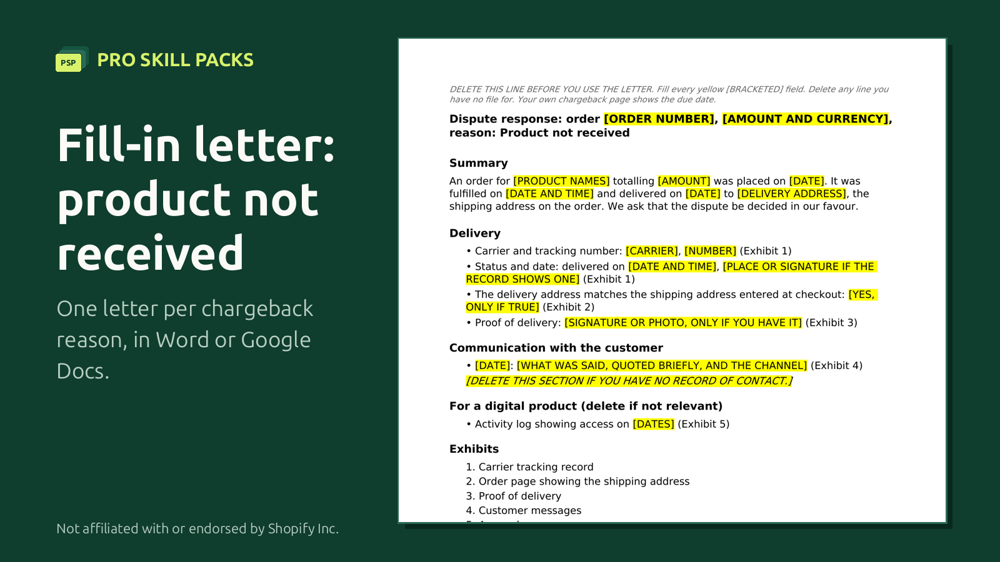
The fill-in letters
The download holds 6 fill-in response letters with checklists (Word .docx files, which open in Google Docs), 6 worked examples and a Start-here PDF, one letter for each reason below. It also has a Word note, 7-USING-WITH-PAYPAL-STRIPE-KLARNA, for customers who paid with PayPal, Stripe or Klarna. Counted from the real file.
One price, $5. No percentage of what you win, no subscription, no surprise charges.
Stuck? Email your filled-in letter to kaiventura.founder@gmail.com before you submit (remove card numbers and anything you don't want to share). We'll tell you what's missing for your reason, usually within one working day. Not legal advice.
Who this is for, and who it is not
- You handle a few disputes a month and can put the evidence together yourself.
- You want to choose which disputes to fight.
- Your orders are large enough that a percentage of what you win hurts.
- You would rather not give anyone access to your store.
- You mainly need alerts that let you refund before a dispute opens. A kit answers a dispute, it does not prevent one.
- You want the work done for you, or you have dozens of disputes a month.
- Your chargeback rate is a problem for Shopify or your processor. A kit does not fix an account.
Services take a percentage of recovered money or a monthly fee; the comparison table below has the prices we could verify, and seven apps are compared on their own page. Where a number is a rough guide rather than something a source states, such as how many disputes a month suit doing it yourself, treat it as one.
What is in the download
Read from the real file.
LICENSE.txtREADME.mdclaude-ai/(1 file:chargeback-response-writer.zip)prompts/(2 files:chargeback-response-writer-v1.0-prompts.pdf,chargeback-response-writer.md)chargeback-response-writer/, the skill itself:SKILL.mdREADME.mdassets/(1 file)references/(1 file)templates/(14 files)
See it run
What it does
Got a chargeback on Shopify Payments? Paste the dispute and say what evidence you have. This skill:
- tells you honestly whether to fight, whether the case is weak, or whether to accept (with the money maths)
- writes a response matched to the dispute reason, ready to paste into Shopify's chargeback response page
- gives you a checklist of which files to attach, where, and in what format
- lists the evidence you're missing and how to get it
Not using an AI assistant? The templates/ folder has fill-in response letters for six reasons (Word / Google Docs) with evidence checklists and worked examples. Open templates/START-HERE.pdf first. templates/7-USING-WITH-PAYPAL-STRIPE-KLARNA.docx covers customers who paid with PayPal, Stripe or Klarna.
Stuck? Email your filled-in letter before you submit (the address is on templates/START-HERE.pdf). Remove card numbers and anything you don't want to share. We'll tell you what's missing for your reason, usually within one working day. Not legal advice.
It never invents evidence. Anything you didn't tell it shows up as a gap or a [CONFIRM] marker, not as a fact. That includes the form of the evidence: if you say "she told me it was a mistake" without saying how, the response won't claim you have it in writing.
Works for: Fraudulent, Unrecognized, Product not received, Product unacceptable / not as described, Subscription canceled, Duplicate, Credit not processed, General. Also handles inquiries, Shopify Protect orders and already-refunded orders. Built from Shopify Help Center and Stripe dispute documentation (October 2026).
How it was tested
Tested on 6 real dispute scenarios from the Shopify Community forum. Every final run scored 9/10 or more, with no invented evidence.
Tested on 5 real dispute scenarios from the Shopify Community forum:
- product not received with delivered tracking
- fraud with hand delivery
- subscription cancelled with two subscriptions
- an unshipped order flagged as fraud
- product unacceptable with no customer contact
Final version: 9/10 on every test, and no invented evidence in any run. The test logs are kept internally.
Update 2026-10-04: the skill no longer states how or when something was said unless you said it (no "in writing", "by email" or exhibit number for a statement you only described), and nothing it marked as "confirm" or "get it in writing" can appear in the response as evidence you hold. Re-tested on a sixth scenario (a customer who says she withdrew the dispute, two runs) and re-run on the first two scenarios above: 9, 9, 10 and 9 out of 10, with no invented or stretched evidence.
The tests ran on real public data, never made-up cases, and were scored against a written rubric. A skill in this range ships only when every test scores 8/10 or more.
How we test, what we do not do, and which assistants we ran it on.
Limits
It won't:
- Promise a win. The cardholder's bank decides.
- Write a fake or "improved" tracking update, message, signature or policy.
- Give legal advice.
Works with
Works with any assistant that reads SKILL.md skills (Claude, Codex, Gemini CLI, Cursor and others), plus a paste-in prompt version for ChatGPT or any chatbot. We run our release tests on Claude Sonnet and Opus. Use your assistant's strongest model: in our tests, a small, fast model added facts that were not in the source data. This skill has no scripts and needs no web access: it works from what you paste.
Install
- Unzip the download. It holds the
chargeback-response-writerfolder, ready-made zips for claude.ai in aclaude-aifolder, a README and the licence. - Put the
chargeback-response-writerfolder where your assistant looks for skills. The generic path is.agents/skills/(ornpx skills addfrom a folder). Tool-specific paths:- Claude Code:
~/.claude/skills/(or.claude/skills/inside one project) - OpenAI Codex, Gemini CLI, Cursor and others:
.agents/skills/or the skills folder their docs name - claude.ai: Customize, Skills, then the plus button, Create skill, Upload a skill, and upload the zip from the
claude-aifolder without unzipping it (code execution must be on in Settings, Capabilities) - ChatGPT or any chatbot: open the skill's
prompt.md, paste it into the chat, then paste your own text or link - Steps for each tool, with links to its official docs: how to install Agent Skills
- Claude Code:
- Ask for the job in plain words, for example: "I got a chargeback, reason Fraudulent, $450. Here is the order and the evidence I have: ...". The skill loads by itself.
Where to start
- Try the free one first. Agent-Ready Quick Check: Six checks on how AI shopping agents read your store, compared with 99 stores we audited.
- In the Store Ops Pack. This skill is one of 6 in the pack, $29. See the pack.
Get it
- You get: a zip with the skill folder and a paste-in prompt version for ChatGPT or any chatbot.
- Checkout: Gumroad opens on this page. Click Add to cart, enter your email and card details, and check the total, with any VAT, before you pay. Prices here are in US dollars.
- After you pay: a download page opens right away with the zip, and Gumroad gives you a receipt there that you can resend. Unzip it, open the prompts folder, paste the prompt into ChatGPT and add your details.
One-time payment. Updates to this version are free. Questions or a refund: reply to your receipt within 30 days, or write to kaiventura.founder@gmail.com.
Related
- Policy Checker (Free): Policy gaps and contradictions across refund, shipping, privacy and terms, with fixes to paste.
- Product Description Rewriter ($5): Clean Shopify HTML descriptions with an SEO title and meta description, for one product or a collection.
- Product SEO Fixer ($5): A prioritised fix list with the exact text to paste, for a product, a collection or a product export CSV.
- More for Shopify store owners: Shopify store owners
Report a problem with this skill (GitHub, or write to kaiventura.founder@gmail.com).