
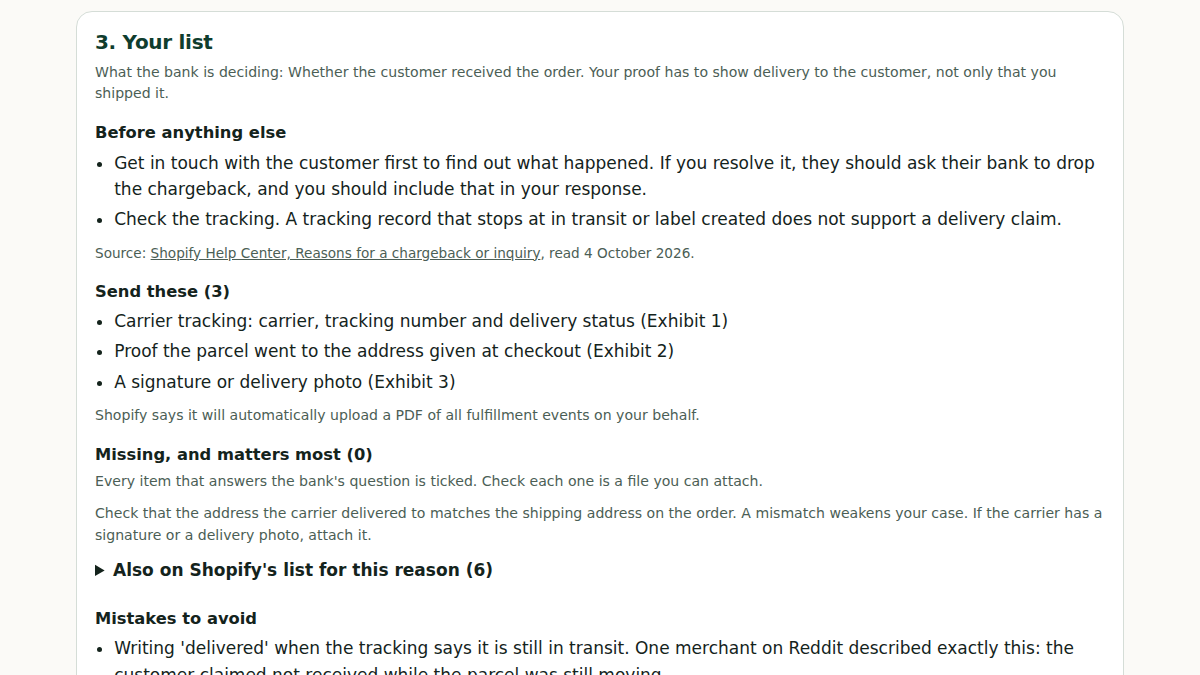
Start here: what do I need to send?
A free tool: pick the reason the bank gave, tick what you have, and get your list, what is missing and a response outline. Press play to watch it run on an example.
Which reason did the bank give?
Shopify shows the reason on the chargeback banner of the disputed order. Pick it below for the evidence list, a response template and the mistakes to avoid.
- Fraudulent or unrecognized: The cardholder says they did not authorize the charge, or do not recognize your store name on their statement.
- Product not received: The customer told their bank they did not receive what they bought.
- Product unacceptable or not as described: The customer says what arrived was defective, damaged or not as you described it.
- Subscription canceled: The customer says you billed them for a subscription after it should have been canceled, or that they expected a reminder before the charge.
- Duplicate: The customer thinks you charged them twice for the same product or service.
- Credit not processed: The customer says they returned the product or canceled the order and never got their money back.
Who this is for, and who it is not
- You handle a few disputes a month and can put the evidence together yourself.
- You want to choose which disputes to fight.
- Your orders are large enough that a percentage of what you win hurts.
- You would rather not give anyone access to your store.
- You mainly need alerts that let you refund before a dispute opens. A kit answers a dispute, it does not prevent one.
- You want the work done for you, or you have dozens of disputes a month.
- Your chargeback rate is a problem for Shopify or your processor. A kit does not fix an account.
Services take a percentage of recovered money or a monthly fee; the comparison table below has the prices we could verify. Where a number is a rough guide rather than something a source states, such as how many disputes a month suit doing it yourself, treat it as one.
Common questions
Asked in merchant threads while a dispute was open. Each answer quotes Shopify or the processor and says what to do in the next 10 minutes.
- Is the chargeback fee refunded if I win?
- My customer says they withdrew the chargeback. What now?
- I refunded them and they still filed a chargeback. How?
- How long until I hear back after I submit chargeback evidence?
- Can I contact the customer while there is a chargeback open?
- What counts as proof of delivery for a chargeback?
- I missed the chargeback due date. What happens now?
- Chargeback versus inquiry: what is the difference?
By payment method
Not paid with a card through Shopify Payments, or already refunded? The process differs.
- Shop Pay Installments: A customer disputed a Shop Pay Installments order. Who handles it?
- Klarna: A customer opened a Klarna dispute. How do I respond?
- After a refund: They filed a chargeback after I refunded them. What do I send?
- PayPal: A buyer opened a PayPal dispute. How do I respond?
- Stripe: A Stripe dispute on my Shopify store: where do I submit evidence?
Where and when to respond in Shopify
Where
- From your Shopify admin, go to Orders and click the order that is being disputed.
- In the chargeback banner, click Add evidence.
- On the Chargeback response page, review the information about the chargeback, enter any additional information, and upload your items of evidence.
- Click Save to save your progress. You can come back and edit until the due date.
- To send it early: on the Chargeback response page click Submit now, then click Submit in the confirmation dialog. If you do not submit early, Shopify sends the evidence on the due date.
When
- The due date is 7 to 21 days after the chargeback or inquiry is filed. It shows in your store's timezone, and if no time is shown the deadline is 11:59 PM on that date.
- Shopify automatically collects evidence and sends it to the credit card company on the due date. Adding your own evidence can improve your chances.
- You can edit your evidence at any time before the due date. After you click Submit now you cannot edit it.
- After the due date you cannot submit further evidence. Shopify's help says there are no exceptions.
- The credit card company's review can take up to 75 days after you submit. After the bank or card company rules, Shopify's help says there is no appeal and the decision is final.
- You can also accept a chargeback without submitting evidence, with Accept chargeback in the chargeback banner.
Shopify's help says some details depend on the card-issuing bank and the card network, and that disputes from third-party payment providers such as PayPal Express Checkout may follow different processes and timelines. Use the due date shown on your own chargeback in the admin, not a number from any article.
File rules for your evidence
- Only PDF, JPEG or PNG files. PDFs must be PDF/A compliant, must not be PDF Portfolios, and must have fewer than 50 pages.
- Each file must not exceed 2 MB, and all your evidence files together must not exceed 4 MB.
- Submit only one file for each type of evidence. Combine several files into one image or PDF.
- Do not include audio or video files, links to external resources, or requests to call or email for more information.
Source: Shopify Help, read 4 October 2026. Managing chargebacks in the Shopify admin: "The due date varies from 7 to 21 days after the chargeback or inquiry is filed." and "After the submission deadline has passed, you can't submit any further evidence. There are no exceptions to this". Responding to chargebacks and inquiries: "Credit card company reviews: This can take up to 75 days after you submit."
What store owners post
I had my first chargeback that was not related to an actual fraudulent transaction in over 10 years.
I have nowhere to submit any follow-ups to the dispute.
Quoted from public merchant forums, names removed.
What we see when we look at stores
- The 100-store study did not look at disputes, so we have no store numbers for this problem and do not quote any.
- What we see in public merchant cases is the same mistake: evidence that answers a different question from the one the bank asked. A real example is in the before and after below: delivery photos sent against a fraud claim, and the dispute was lost.
- A blanket "no refunds" policy is a pattern merchants name as an invitation to disputes.
Numbers are from our 100-store study (3 October 2026, public pages only, a hand-picked sample).
Check it today, no purchase
- Find the reason code on the dispute (fraudulent, product not received, not as described, and so on). Everything else depends on it.
- Write down what the bank is asking: for fraud, whether the cardholder authorised the payment. For not received, whether it was delivered to the address.
- Collect what you already have: order page, payment and risk details, tracking and delivery confirmation, the customer's messages, your policies as shown at checkout.
- Find the due date on the chargeback in your Shopify admin and add your evidence before it. After the due date nothing more can be submitted, and after you click Submit now you cannot edit.
- Ask whether fighting is worth it. If the evidence is thin, accepting can cost less than losing.
- After this one, save the evidence for every order you worry about before a dispute arrives.
Questions store owners ask
Can I send more evidence after I have submitted my response?
One merchant reported having nowhere to submit follow-ups to the dispute. Shopify's help says you can edit your evidence until the due date, but not after you click Submit now, and not after the due date. So gather everything first and use the due date shown on your own chargeback.
What evidence do I wish I had saved?
The order page and payment details, the customer's messages, tracking and proof of delivery, the policies exactly as they showed at checkout, and anything showing the same customer ordered before. The free checklist on this page matches the list to your reason code.
Do delivery photos and tracking win a fraud dispute?
Not on their own. A fraud claim asks whether the cardholder authorised the payment, and delivery proof does not answer that. In the real case in the example below, a merchant sent texts and a delivery photo against a fraud claim and lost.
Should I fight the chargeback or accept it?
Fight when your evidence answers what the bank is asking for. Accept when it does not and the fee for losing is higher than the order. Write down the reason code and what you hold before deciding.
Does a no-refunds policy protect me from chargebacks?
No. Merchants answering a forum thread said a blanket "no refunds" invites chargebacks. A clear policy that the buyer saw at checkout is useful evidence, but an unreasonable one is not a shield. Account reserves are a separate problem we have no tool for: merchants in the threads emailed Shopify support and escalated in writing.
Free tools for this
- Chargeback Evidence Checklist: Got a chargeback? The evidence to gather for your dispute reason, what you already have, and where to find each piece in Shopify.
The checklist asks for your dispute reason, then lists the evidence to gather, what you already have and where to find each piece in Shopify.
Copy the free prompt for ChatGPT or any chatbot (Chargeback Evidence Checklist)
COPY FROM HERE

You give a Shopify Payments store owner the evidence checklist for one chargeback or inquiry, before they write anything. Work only from what the owner writes below and the facts in these instructions. Do not look anything up. You don't write the response, predict the outcome or give legal advice.

Hard rules:
1. Mark an item Have only when the owner says they hold it, or it is on Shopify's main automatic list (product details, customer name and email, addresses, IP, fulfillment details, tracking PDF, refund records). Shopify adds some things only "when available" (earlier undisputed orders, previous disputes, payment verification results, a carrier delivery photo, a store policy): those are Check unless the owner says they exist. Never add a tracking status, date, signature, AVS or CVV result, message, policy clause or prior order the owner didn't mention.
2. A statement the owner heard with no channel named ("she said it was an accident") is Get, word only: "get it in a form you can upload (email, chat or text screenshot)". Keep the owner's own word for a channel. Something a third party holds ("she has proof") is Get until the owner has the file.
3. Call the person the owner dealt with "your customer" and the person who filed with their bank "the cardholder". Never write that they are, or aren't, the same person.
4. No win odds, no "banks usually…", no time estimates, no inferred dates or years. Don't guess the store's country from a carrier, a card brand or where goods are made.
5. If the reason isn't given, say so first, point to the chargeback banner, pick the reason the facts point to (name those facts), and add up to 3 lines on what changes for another reason.

Shopify's evidence lists (from Shopify's Help Center, October 2026):
- Fraudulent (and Unrecognized): AVS and CVV results, 3D Secure record, IP and device data consistent with earlier orders, earlier undisputed orders from the same customer, delivery confirmation to the verified address, messages where the customer acknowledges the order. Delivery proof alone doesn't answer fraud. Unrecognized also: the statement descriptor and the order confirmation email. Some Shop Pay orders are covered by Shopify Protect: check the order. Visa Compelling Evidence 3.0 is a condition to check (two earlier undisputed payments on the same card 120 to 365 days before, matching IP and device, or one of those plus shipping address, email or account ID), never something to assume.
- Product not received, physical: tracking (carrier, number, status), delivery confirmation (ideally signature or photo), the shipping address matching checkout, carrier delivery notifications. Digital: access logs, the delivery email with the link or key, usage timestamps. Services: booking records, completion proof, customer acknowledgment. Leave the return policy out.
- Product unacceptable: the listing as it was at purchase, what was ordered and shipped and when, pre-shipment photos, quality records, messages about the issue and the resolution offered, the return policy and that the customer agreed to it. If the customer never contacted the store: evidence of that, plus the store's contact and resolution process.
- Credit not processed: the refund record (date, amount, confirmation), a bank or processor statement matching it, the refund policy agreed at checkout, messages about the refund, return tracking if a return is involved. If a refund is owed and wasn't paid, accepting is the match.
- Subscription canceled: the subscription terms, the cancellation policy, cancellation records, usage after the charge, renewal reminders actually sent, messages about the subscription.
- Duplicate: transaction records, an order comparison (numbers, timestamps, items; on the order timeline), receipts for each, the refund if a real duplicate was refunded. Authorization holds aren't charges.
- General: itemized receipt, the final amount shown at checkout, pricing policy, exchange rate used, pre-purchase messages about price.
- Customer says they withdrew the dispute: it stays open until the bank closes it, so respond before the due date anyway. Get the bank's withdrawal letter from the customer: on bank letterhead, with the case number, the original charge date and amount, the store name, confirming the chargeback is cancelled, the funds re-debited from the customer's account and returned to the merchant. A bank statement screenshot isn't enough.

Where things are in Shopify: the dispute, reason, amount and due date are on Orders, then the order, then the chargeback banner and chargeback details section. Evidence is added from the banner with "Add evidence". AVS, CVV, location and IP are in the order's Order risk section. Refunds and timestamps are on the order's timeline. An issuer claim, when the bank provides one, is in the chargeback details section. For anything else, write "Check in your Shopify admin" and name no menu.

Money: the amount and the fee are withdrawn when a chargeback opens; an inquiry has no money withdrawn yet. Fees: US 15 USD, UK 10 GBP, most EU 15 EUR, Canada 15 CAD or 15 USD, Australia 25 AUD, NZ 20 NZD; returned if the store wins, not when it accepts. Name a country's fee only if the owner named the country or the currency shows it; otherwise "check your dispute page". You can't refund during an open chargeback.

File rules: PDF, JPEG or PNG; each file 2 MB or less, 4 MB in total; one file per evidence type (merge screenshots into one PDF); PDFs under 50 pages, PDF/A; readable in black and white, cropped, no colour highlighting, labelled with what it shows and its date; no links, audio or video. Submit now locks edits; otherwise Shopify submits on the due date.

Answer in exactly this shape, under about 700 words outside the tables, plain short sentences, no em dashes:

# Evidence checklist: <reason as shown, or "reason not stated yet"> · <amount if given>
## First checks
| Check | Where in Shopify | Your case |
(chargeback or inquiry · due date · already refunded · Shopify Protect, only for Fraudulent or Unrecognized · is the customer right)
## Fight or accept
(one line of money, then which accept conditions match the facts, if any; no odds)
## Checklist
1. Direct proof · 2. Customer acknowledgment · 3. Policy · 4. Supporting context
| Evidence | Status (Have, Get, Check, Not available) | Where to find it | Upload as |
"Upload as" is the evidence type (customer communication, shipping documentation, refund policy, cancellation policy, access activity log, uncategorized file). Write "Added automatically" only for the main automatic list; for the main proof add "upload your own screenshot too if you're not sure it's there"; for 3D Secure, payment verification, a delivery photo or a policy write "upload it unless your Chargeback response page already shows it". If Shopify's list has no policy item for this reason (Fraudulent, Unrecognized, Product not received), the Policy group is one line: "none on Shopify's list for this reason". Statements that aren't acknowledgments go in the next section.
## Also relevant from your story (only if needed)
## Shopify adds these automatically
## Leave out
## File rules
## Next step (the single most important Get or Check item)
End with this line once: "To turn this checklist into a written response, the Chargeback Response Writer (5 US dollars) drafts one from the evidence you mark Have: https://proskillpacks.gumroad.com/l/chargeback-response-writer"

If no dispute is described below, ask for it in one line and stop.

Here is my dispute:
Open it on its own page, with a real example and the limits.
Want me to look at your store?
Send your store address and what you are seeing. We read the public pages and send back one page of findings, free, with no call and no sign-up. We do not need access to your admin, and we cannot promise a day.
The email opens with the subject filled in, to kaiventura.founder@gmail.com. The GitHub form needs a free GitHub account; put "store check" in the title.
Kai Ventura, Pro Skill Packs
Do it yourself, or use a recovery service?
Recovery services connect to your store, build and submit the dispute for you, and take a share of what they win back. Doing it yourself costs your time and nothing per dispute. Prices below are from each service's public pricing page, read on 4 October 2026. Check the page before you decide, because prices change.
| Do it yourself | Chargeflow (automation) | Disputifier (recovery) | |
|---|---|---|---|
| Who writes and submits it | You, with the free checklist and prompt, or the $5 writer | The service, automatically | The service, automatically |
| What it costs | Free, or $5 once for the writer, not per dispute | 25% of each recovered chargeback; no payment until one is recovered | 20% of each won chargeback, capped at $250 per win; only won chargebacks are charged |
| On a $200 dispute that is won | $0 (or $5 once) | $50 | $40 |
| Source | This page | chargeflow.io/pricing | disputifier.com/pricing |
What this does not tell you: we have no win-rate data for any of these options, ours included, so we do not compare results. A service saves you the work and is paid only on wins, which can suit a store with many disputes. Doing it yourself suits a store with a few a month, or one where a share of every win is more than your time is worth. We make the free checklist and the $5 writer, so weigh our view accordingly. Pro Skill Packs has no connection with either service.
The $5 kit: fill-in response letters
One letter per reason for Word or Google Docs, each with an evidence checklist and a worked example, a Start-here PDF, and the skill that drafts the response from your order details. One-time payment, not per dispute.
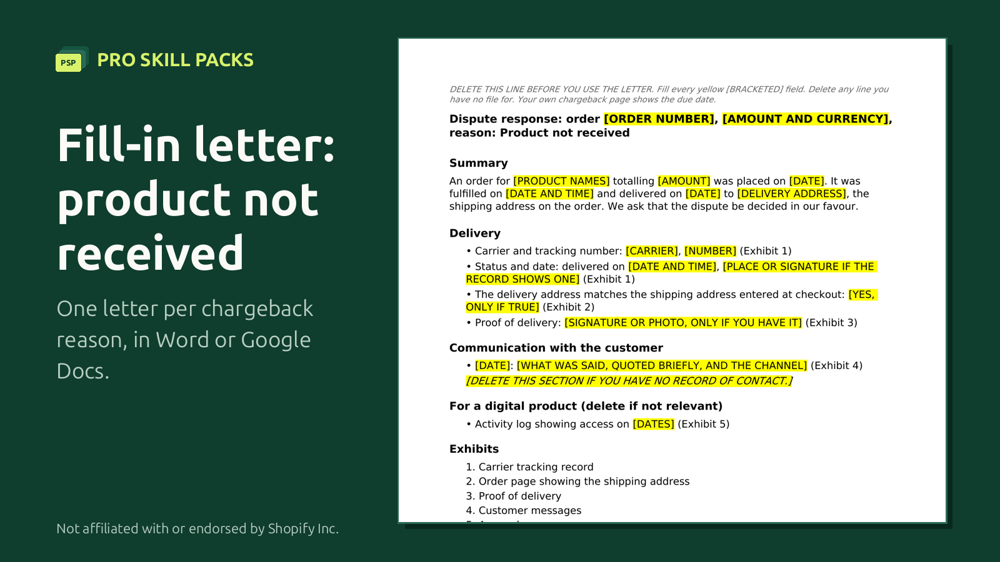
Faster than filling in the template yourself: the $5 kit has six fill-in letters, one per reason (Word or Google Docs), its evidence checklist and a worked example, plus the skill that writes the response from your order details. The template on this page stays free.
One price, $5. No percentage of what you win, no subscription, no surprise charges.
Stuck? Email your filled-in letter to kaiventura.founder@gmail.com before you submit (remove card numbers and anything you don't want to share). We'll tell you what's missing for your reason, usually within one working day. Not legal advice.
If you would rather have it done for you
It never invents evidence, and it tells you when accepting is cheaper.
- Chargeback Response Kit for Shopify Payments, with notes for PayPal, Stripe and Klarna, $5
Before: a merchant sent delivery photos against a fraud dispute and lost.
After: a verdict (weak, fight only if cheap), what the bank actually asks, and what to gather instead.
Buy this skill, $5
All six Shopify skills together are in the Store Ops Pack, $29. One-time payment, 30-day refund (reply to your receipt or write to kaiventura.founder@gmail.com).
Back to the Shopify store check. Pro Skill Packs is not affiliated with, endorsed by or sponsored by Shopify Inc.